Log inBook a presentation
NexaFacility/Full context. At the device itself.

FACILITY & ASSET MANAGEMENT

Full context. At the device itself.

Mobile tasks, QR, checklists, photos, service reports and working time. Explore the interface and Android APK.

OFFICE AND FIELD IN THE SAME PROCESS

The work happens at the asset.
The information should be there too.

Task and documentation at the technician's fingertips. Result to be checked by the manager. Status for the submitter. No rewriting the service report when you return to your desk.

TechnicianTask, QR, checklist, photos and stopwatch.
ManagerPriorities, assignment and approval of work.
SubmitterReport a fault and follow its status.

Version 1.0.0 (10022) • 16.9 MB · iOS — coming soon
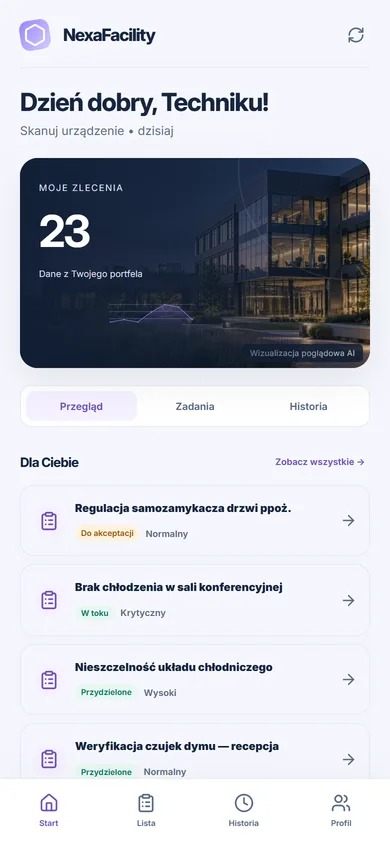
NexaFacility Technician AppTrue mobile view in browser

FIELD WORK

One task, even during network interruption.

Before leaving

Open the task data with an available network and select an organisation.

In progress

Use checklist, documents and supported outbox operations.

After connecting

Check the queue, synchronisation and possible version conflict.

Read the offline rules

MOBILE APP

Get NexaFacility on your phone

Requests, work orders and inspections in the field — with asset cards opened by QR code and an offline work queue.

All about the mobile app
AndroidVersion 1.0.0 (10022) • 16.9 MB
Download the APKRequires Android 6.0 or laterThe APK is installed outside an app store — Android will ask you to allow installation from this source.SHA-256 checksum: ab03235fe09d5a93ef9d04a74c91ed4e91365b5d53392aea840be11280d1fe79
iOSiOS — coming soon

The iPhone version will appear once it is published in the App Store. Until then you can use NexaFacility in your phone’s browser.